Qelvaramixe
Nova Flow
Nova Flow
Couldn't load pickup availability
1. Problem Statement
Many who have already tried basic HTML and CSS lessons feel there is too much information and not enough structure. You’re not alone — after the first steps, it’s often hard to understand how to combine knowledge into complete pages and add initial interactivity.
2. Solution
Nova Flow is a set of materials that helps organize basic knowledge and move on to creating full pages. Here you learn how to build responsive design, work with forms, and add simple JavaScript logic step by step.
3. What's Inside
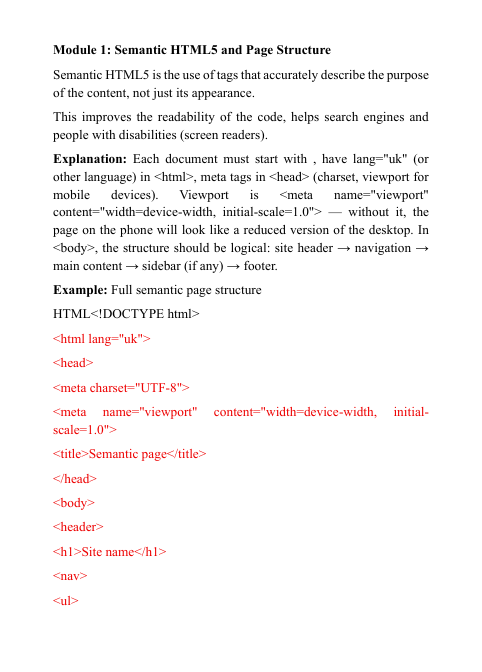
- Module 1: Semantic HTML5 & Structure — Detailed coverage of modern tags (header, nav, main, article, footer), attributes, and best practices for accessibility and SEO-friendly markup.
- Module 2: Flexbox & Grid — Practical examples of building responsive layouts with Flexbox and CSS Grid, including alignment, order, and media queries for different screen sizes.
- Module 3: Forms & Validation — How to create contact forms, input fields, checkboxes, radio buttons; basic validation via HTML attributes and simple JavaScript checks.
- Module 4: Events & DOM Manipulation — Learning click, input, submit events; finding elements (getElementById, querySelector), changing text, styles, and attributes via JS.
- Module 5: Practical Mini-Project — Step-by-step creation of a landing page: structure, styling, form with submission message, and simple click animation.
- Module 6: Developer Tools — How to use browser DevTools to inspect code, edit styles live, and debug JavaScript.
4. Who is this for?
✅ Suitable if you...
- already know basic HTML/CSS and want to organize your knowledge;
- want to learn to create responsive pages;
- are ready to add first interactivity with JavaScript;
- need clear examples and tasks for independent practice.
❌ Not suitable if you...
- are just starting from zero (better begin with Free Key);
- already work freely with modern frameworks and are looking for advanced topics.
5. What You'll Learn
- How to use semantic HTML5 tags for logical page structure;
- How to build flexible and responsive layouts;
- How to create and style forms with basic validation;
- How to add event handlers and change page content via JavaScript;
- How to find and manipulate DOM elements;
- How to inspect and debug code using browser tools;
- How to combine HTML, CSS, and JS in a small real project step by step;
- How to write code that is easy to read and maintain in the future.
9. Guarantee
- 30-day money back
- Risk-free
- ⚡ Instant access after purchase
- ∞ Lifetime access & updates included
- 🔐 Secure & encrypted checkout
- 🛠️ Last updated: 2026
Self-paced learning overview
What level of knowledge is required?
What level of knowledge is required?
The materials are suitable for beginners with no prior experience, as well as for those who want to systematize basic knowledge of HTML, CSS, and JavaScript. Each module starts with the basics and gradually moves on to more complex topics.
How are the materials organized in the tariffs?
How are the materials organized in the tariffs?
All tariffs consist of step-by-step lessons, code examples, practical exercises, and explanations. You can go through them at your own pace, returning to previous modules when necessary.
Are there practical exercises in the courses?
Are there practical exercises in the courses?
Yes, each module provides code examples for independent reproduction and exercises to consolidate the material to develop skills through practice.
Share